Issue:
The following are Command Barcodes that control various functions of the Socket Mobile 7xi scanner used with SAGE Showlink
Solution:
IMPORTANT! Make sure the CHS is not connected to a host computer / device before
scanning a command barcode.
| Factory Reset Configures the CHS to revert all settings to factory defaults. The CHS powers off after scanning this barcode. |
 |
|
| iOS Mode Changes the CHS 7Xi or 7XiRx to Apple iOS mode (equivalent to SPP mode). |
 |
|
| Version Information (for HID mode only) Commands the CHS to output the firmware version information into an active application. |
 |
|
| Center Decoding When enabled, the CHS reads only the barcode that the scanner is aimed at. Helpful for barcodes positioned close together. |
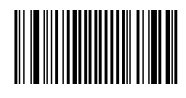 |
|
| Disable Code 39 Barcodes | 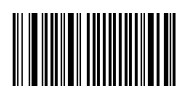 |
|
| Disabe QR Codes | 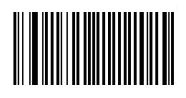 |
|
| Decode on Reflective Surface Enables the CHS to decode 1D and 2D barcodes printed on shiny surfaces |
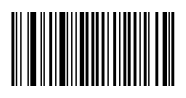 |
|
| Decode in Bright Environment Enables the CHS to scan 1D and 2D barcodes in bright environment. |
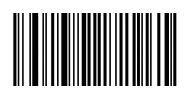 |
|
| Decode 1D and 2D Barcodes Configures the CHS to revert all settings to factory defaults. The CHS wil power off after scanning this barcode. |
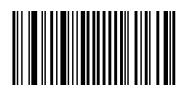 |
|
| Type: | Info | Publish Date: | 1/23/2012 2:31:25 PM |
| Applies To: | ShowLink | Last Updated: | 2/1/2013 2:33:22 PM |
| Platform: | All | Expiration Date: |